About Highlights by FANG
"Highlights" allows you to shorten video without complicated operation. The only operation you should do is to put stars on your favorite moments. After that, the app will do all edit on your behalf. Basic Usage 1. Select...
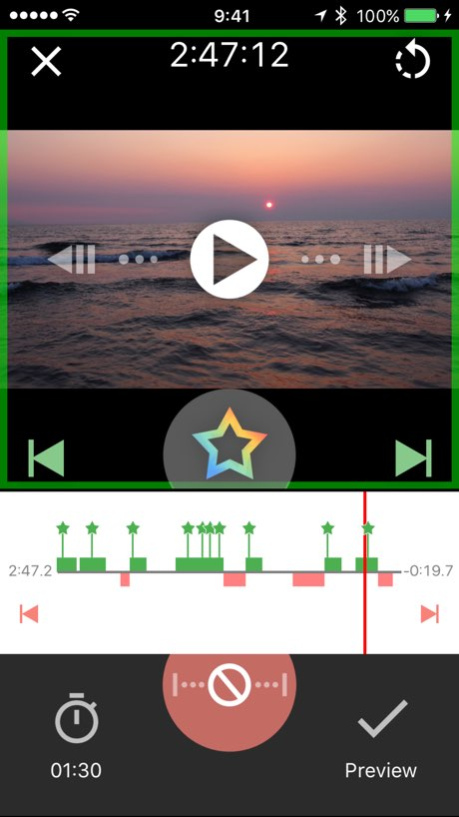
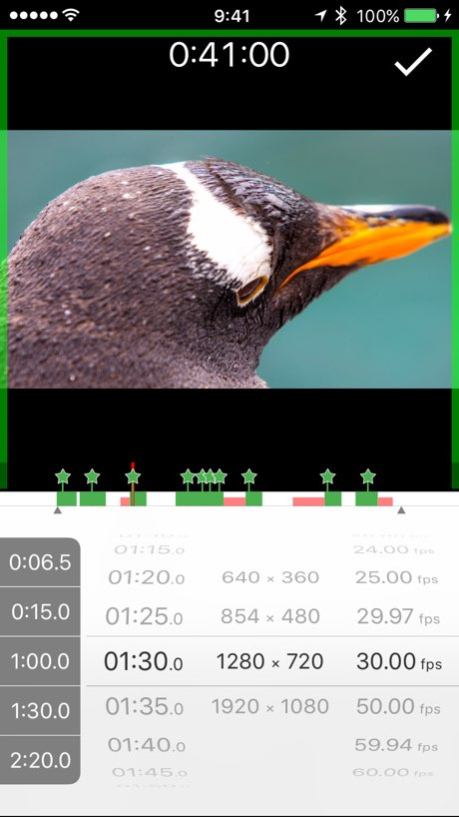
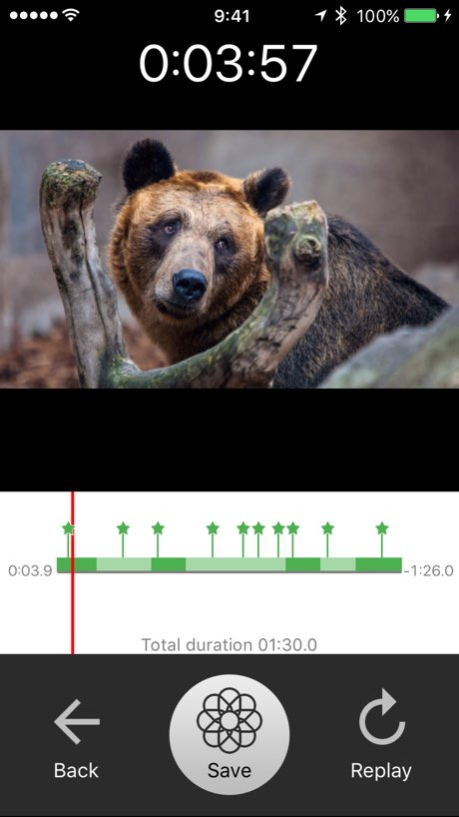
"Highlights" allows you to shorten video without complicated operation. The only operation you should do is to put stars on your favorite moments. After that, the app will do all edit on your behalf. Basic Usage 1. Select a video you want to shorten. 2. Put "Stars" on your favorite moments. 3. Preview the auto-edited video. 4. Save to Album. That's all. Other Editing Features - Fix a misangled video. - Set the duration time of the outcome. - Specify exclusion ranges. - In addition to the normal video format, you can save it as LivePhotos. Please tap and hold Save button when saving.
Version History - Fixed minor bug. - Support for LivePhotos export. * (*) Tap and hold Save button to export as LivePhotos. 1.1.2 11/28/2017 - Support for iOS11. 1.1.1 09/20/2017 - Supported iOS 10. - Supported iCloud Photo Library. - Live Photos can now be loaded with optional settings. * Default is off. - It corresponds to haptic feedback of iPhone 7/7 Plus. It is also possible to turn it off on the setting screen. - Five "Custom Presets": If you specify the number of output seconds, resolution, frame rate in advance, you can call it instantaneously on the time setting screen. - New "skip mode": This is a mode to snap only to favorite points and exclusion points. When previewing, it instantly moves to the beginning of each scene. To enter this mode, please move your finger down when seeking the timeline. - The excluded area can be set even when the favorite point is not set yet. - When the favorite point is not set, the entire video is saved regardless of the output seconds setting. - Fixed some small bugs. 1.1.0 11/22/2016 1.0.0 12/10/2015
Previous Versions
Here you can find the changelog of Highlights by FANG since it was posted on our website on 2016-09-30 16:26:56.
The latest version is 1.1.2 and it was updated on 2026-10-07 08:11:57. See below the changes in each version.
Highlights by FANG version 1.1.2
Updated At: 2026-10-06
Changes: Version History - Fixed minor bug.
- Support for LivePhotos export. *
(*) Tap and hold Save button to export as LivePhotos. 1.1.2 11/28/2017 - Support for iOS11. 1.1.1 09/20/2017 - Supported iOS 10.
- Supported iCloud Photo Library.
- Live Photos can now be loaded with optional settings. * Default is off.
- It corresponds to haptic feedback of iPhone 7/7 Plus. It is also possible to turn it off on the setting screen.
- Five "Custom Presets": If you specify the number of output seconds, resolution, frame rate in advance, you can call it instantaneously on the time setting screen.
- New "skip mode": This is a mode to snap only to favorite points and exclusion points. When previewing, it instantly moves to the beginning of each scene. To enter this mode, please move your finger down when seeking the timeline.
- The excluded area can be set even when the favorite point is not set yet.
- When the favorite point is not set, the entire video is saved regardless of the output seconds setting.
- Fixed some small bugs. 1.1.0 11/22/2016 1.0.0 12/10/2015
Highlights by FANG version 1.1.2
Updated At: 2026-09-05
Changes: Version History This app has been updated by Apple to prepare for watchOS 27 compatibility. No new features are included.
- Fixed minor bug.
- Support for LivePhotos export. *
(*) Tap and hold Save button to export as LivePhotos. 1.1.2 11/28/2017 - Support for iOS11. 1.1.1 09/20/2017 - Supported iOS 10.
- Supported iCloud Photo Library.
- Live Photos can now be loaded with optional settings. * Default is off.
- It corresponds to haptic feedback of iPhone 7/7 Plus. It is also possible to turn it off on the setting screen.
- Five "Custom Presets": If you specify the number of output seconds, resolution, frame rate in advance, you can call it instantaneously on the time setting screen.
- New "skip mode": This is a mode to snap only to favorite points and exclusion points. When previewing, it instantly moves to the beginning of each scene. To enter this mode, please move your finger down when seeking the timeline.
- The excluded area can be set even when the favorite point is not set yet.
- When the favorite point is not set, the entire video is saved regardless of the output seconds setting.
- Fixed some small bugs. 1.1.0 11/22/2016 1.0.0 12/10/2015
Highlights by FANG version 1.1.2
Updated At: 2026-08-26
Changes: Version History This update from Apple will improve the functionality of this app. No new features are included.
- Fixed minor bug.
- Support for LivePhotos export. *
(*) Tap and hold Save button to export as LivePhotos. 1.1.2 11/28/2017 - Support for iOS11. 1.1.1 09/20/2017 - Supported iOS 10.
- Supported iCloud Photo Library.
- Live Photos can now be loaded with optional settings. * Default is off.
- It corresponds to haptic feedback of iPhone 7/7 Plus. It is also possible to turn it off on the setting screen.
- Five "Custom Presets": If you specify the number of output seconds, resolution, frame rate in advance, you can call it instantaneously on the time setting screen.
- New "skip mode": This is a mode to snap only to favorite points and exclusion points. When previewing, it instantly moves to the beginning of each scene. To enter this mode, please move your finger down when seeking the timeline.
- The excluded area can be set even when the favorite point is not set yet.
- When the favorite point is not set, the entire video is saved regardless of the output seconds setting.
- Fixed some small bugs. 1.1.0 11/22/2016 1.0.0 12/10/2015
Highlights by FANG version 1.1.2
Updated At: 2017-11-28
Changes: This app has been updated by Apple to display the Apple Watch app icon.
- Fixed minor bug.
- Support for LivePhotos export. *
(*) Tap and hold Save button to export as LivePhotos.
Highlights by FANG version 1.1.2
Updated At: 2017-11-28
Changes: 28 nov. 2017 Version 1.1.2
- Fixed minor bug.
- Support for LivePhotos export. *
(*) Tap and hold Save button to export as LivePhotos.
Highlights by FANG version 1.1.2
Updated At: 2017-11-28
Changes: Nov 28, 2017 Version 1.1.2
- Fixed minor bug.
- Support for LivePhotos export. *
(*) Tap and hold Save button to export as LivePhotos.
Highlights by FANG version 1.1.2
Updated At: 2017-11-28
Changes: Nov 28, 2017 Version 1.1.2
This app has been updated by Apple to use the latest Apple signing certificate.
- Fixed minor bug.
- Support for LivePhotos export. *
(*) Tap and hold Save button to export as LivePhotos.
Highlights by FANG version 1.1.2
Updated At: 2017-11-28
Changes: Nov 28, 2017 Version 1.1.2
This app has been updated by Apple to display the Apple Watch app icon.
- Fixed minor bug.
- Support for LivePhotos export. *
(*) Tap and hold Save button to export as LivePhotos.
Highlights by FANG version 1.0.0
Updated At: 2015-12-10
Highlights by FANG version 1.1.2
Updated At: 1970-01-01
Changes: 2017年11月28日 Version 1.1.2
- Fixed minor bug.
- Support for LivePhotos export. *
(*) Tap and hold Save button to export as LivePhotos.
Disclaimer
Official App Store Link
We do not host Highlights by FANG on our servers. We did not scan it for viruses, adware, spyware or other type of malware. This app is hosted by Apple and passed their terms and conditions to be listed there. We recommend caution when installing it.
The App Store link for Highlights by FANG is provided to you by apps112.com without any warranties, representations or guarantees of any kind, so access it at your own risk.
If you have questions regarding this particular app contact the publisher directly. For questions about the functionalities of apps112.com contact us.